
Modern apps have evolved a lot since the beginning years of app development. This is because compared to the previous times, modern apps can perform multiple operations at the same time. For this feature, the core infrastructure needs constant access to multiple methods and elements at the same time. This process improves the complexity of not only the app development process but also mobile app testing. With the implementation of modern automated testing tools, app developers can improve the efficiency of testing these complex applications. It is also possible to integrate Agile methodologies to improve the efficiency of the development cycle. This is because, with Agile methodologies, it is possible to perform the development and testing cycles side by side.
With this article, we are going to explore the process of testing locally hosted applications with the implementation of app automation. We will also understand how modern platforms like cloud-based solutions and various tools can influence this process.
Table of Contents
Exploring Modern App Automation
Though the primary intention of app automation is to improve the efficiency of the test cases, it also has a role in improving the quality of the apps. In simple terms, it is the process of eliminating human involvement in the test case execution process. As a replacement, the system will use a series of predetermined parameters that will allow it to emulate human interactions. Based on these interactions and communications, the system will generate a report that will show whether the app is fit to be forwarded to the production phase.
While implementing app automation, the developers can improve the testing cycle in the following ways:
- Using test automation, it is possible to initiate thousands of different test instances at the same time. For this process, test automation uses the feature of parallel test execution. Using this method, it is possible to automatically allocate the test cases based on the testing parameters.
- Automation testing helps improve the accuracy of the testing process as it is devoid of errors that can arise due to human involvement. Moreover using this process, the app developers can run the test cases 24 hours round the clock which is ahead of human abilities.
- While implementing test automation, app developers can also integrate advanced technologies like parallel test execution, real-time activity logs, and agile methodologies to improve the quality of the application development project.
- Automation testing also helps to save the company resources and time in the long run. This is because after implementing this technology, the app testers can eliminate the manual testing team. However, it is worth remembering that automation testing has a high initial cost for transitioning into this technology.
Importance of Locally Hosted Apps
The term locally hosted apps signifies those applications that have local host servers. The primary objective of the development of such applications is to help the company with its internal operations. Since these applications can only operate in the local area network, they need to provide the full functionality of a website or application using a wired connection.
Local hosts are also used by the developers to check the functioning of their applications before releasing them completely to the end users.
Let us analyze some of the common instances when the developers might maintain a local host:
- It is useful to verify the app infrastructure for errors like unstable speed or bugs in the core infrastructure.
- The local host also allows the app developers to freely block websites from user access when it is undergoing the development or testing process.
- It also helps to boost the cyber security of the application as it is devoid of a global network and is restricted to the local server.
- A locally hosted application has improved infrastructure as it has various features like faster loading times, accelerated development, and enhanced backup for storing important company data.
LambdaTest and Its Integration with Modern Automated Testing Tools

Real Device Testing is a crucial parameter for verifying the accuracy of modern apps. However, the process of setting up and maintaining a real device test environment is very expensive and often resource-consuming. Through cloud platforms like LambdaTest, app developers can eliminate this process as it allows the developers to perform the test cases on real devices through remote servers. LambdaTest also allows the execution of automated testing on local applications through its tunnel capability.
While using LambdaTest for executing automation test cases on locally hosted apps, the app developers can enjoy the following features:
- Using the cloud infrastructure, LambdaTest executes the test cases on not only real devices but also older browser versions and legacy devices which improve the compatibility of the application and increase the possible audience reach.
- LambdaTest helps to maintain a real-time activity log that keeps track of all the test cases including the failed test instances. This data can act as a reference point when the app testers are looking for known errors in the code infrastructure.
- Using LambdaTest, the app testers can generate a detailed test report that can store visual data in the form of screenshots and videos. The test activity logs also help the app developers to quickly pinpoint and highlight the errors so that they can be easily removed through debugging and troubleshooting.
- LambdaTest can execute automation test cases from various well-known frameworks like Playwright, Selenium, and Cypress. While using these frameworks, the developers can run the test instances simultaneously on thousands of different configurations including real devices, simulation software, and browser instances.
- LambdaTest also has an extensive support system to help the new automation testers with the features and tools. Some of the possible support methods include live chat, mailing feature, and over-the-phone support. It also has an extensive community of developers and testers where they can discuss among themselves various issues.
Testing Locally Hosted Apps with App Automation
While using LambdaTest for executing the automation test cases, the app developers can easily verify the functioning of locally hosted apps. For the simplicity of new automation testers, we have listed all the required steps in the intended order:
1. Setting Up the LambdaTest Account
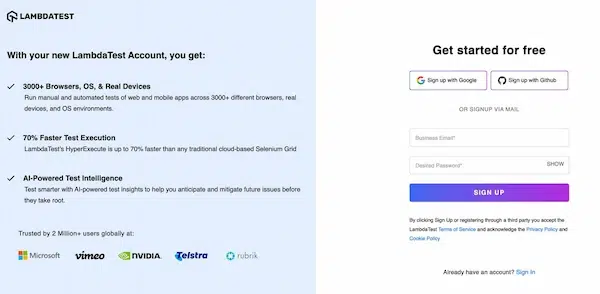
For the new testers, the first step in this process is to set up the LambdaTest account by navigating to the official website and following the on-screen instructions. They also have to purchase the relevant license for accessing the username and access key from the LambdaTest automation testing dashboard.
2. Defining the Automation Test
After signing in to the LambdaTest account, it is time to create a new automation test project from the LambdaTest dashboard. The app developers can name this position according to the application undergoing the development process.
3. Setting the target Browsers and Devices
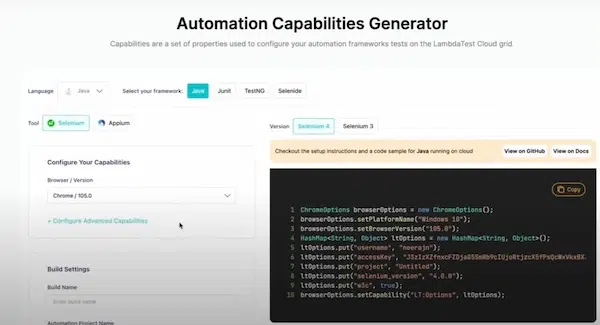
Depending on the target elements of the application, it is time to set up the parameters and distinct capabilities. For instance, in this process, the automation testers have to specify the target browsers, devices, and operating systems. Based on these parameters, the system will automatically filter the test cases and redirect the execution process.
4. Setting up the Automation Testing Framework
As we already mentioned earlier, LambdaTest supports multiple automation testing frameworks for initiating test cases. Some of the popular choices include WebDriverIO, Selenium, and many others. However, during this process, the app developers must choose the correct automation testing framework depending on their app. For instance, Selenium will be a great choice when the developers are working with web-based apps.
5. Writing the Test Scripts

Now that we have completed the initial setup and the primary configuration process, it is time to write the automation test scripts for verifying the functioning of locally hosted apps. During this process, the app developers must choose a programming language that is not only supported by LambdaTest but also by their preferred automation testing framework. Some of the popular choices include JavaScript and Python.
6. Configuring the Local Testing Environment
While using LambdaTest, the app testers can run the test cases on locally hosted applications using the tunnel capability. This capability also allows the execution of the test cases in a secure environment. So, the developers have to set up and configure the tunnel with their automation script. This will allow them to connect the local environment to the LambdaTest cloud testing infrastructure. The LambdaTest terminal value looks like the following:
“tunnel” :
True,
The following series of steps will allow the configuration of the tunnel capability:
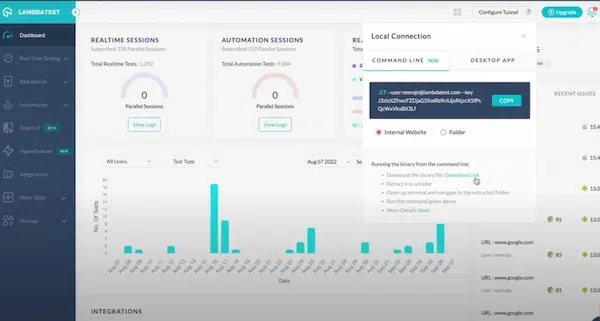
- The first step is to download all the required binary files depending on the target operating system. Some of the popular choices include 64-bit Windows 11, Mac OS, and many others.
- After this, the developers have to extract the downloaded files and navigate to the command prompt. Using the command prompt menu, the developers have to pinpoint the location of the extracted files.
- The app developers have to run the following command to set up a connection with the LambdaTest tunnel:
./LT –user {user’s login email} –key {user’s access key} –tunnelName {user’s tunnel name}
Finally, the following code will set up the LambdaTest environment to run a Selenium script on a locally hosted app using the tunnel feature:
from selenium import webdriver
from selenium.webdriver.common.desired_capabilities import DesiredCapabilities
desired_caps = {
“build”: “Local App Testing”,
“name”: “My Local App Test”,
“platform”: “Windows 10”,
“browserName”: “chrome”,
“version”: “latest”
}
tunnel = “YOUR_LAMBDATEST_TUNNEL_ID”
driver = webdriver.Remote(
command_executor=f”https://{tunnel}:{tunnel}@hub.lambdatest.com/wd/hub”,
desired_capabilities=desired_caps
)
driver.quit()
7. Executing the Test Cases

Now, it is finally time to execute the test script using the LambdaTest cloud infrastructure. The test environment will interact with the locally hosted app using the secure tunnel. It will run the test cases on the defined parameters.
8. Viewing the Test Report
After executing the test case, the LambdaTest API will display a detailed test report showing the errors in the application if any. The test report would also consist of multiple screenshots, videos, and other details for simplifying the debugging process.
9. Debugging the Test Case
Finally, the app testers have to implement the necessary changes and re-run the test cases to ensure that the app is stable and ready to be forwarded to the production phase.
The Final Verdict
The knowledge of testing locally hosted apps with the help of automation testing will help the developers improve their productivity and efficiency in the testing environment. It is also important to collect adequate information regarding automation testing trends and innovations. All this data will help the developers to improve the quality of the application so that they can build a positive image for their brand. It is also a wise decision to collect information regarding the requirements of the target customers. Finally, it is very important for the app developers to properly choose their desired automation testing tools and frameworks.