Table of Contents
Racing Simulators
1. The Foundation: Choosing the Chassis
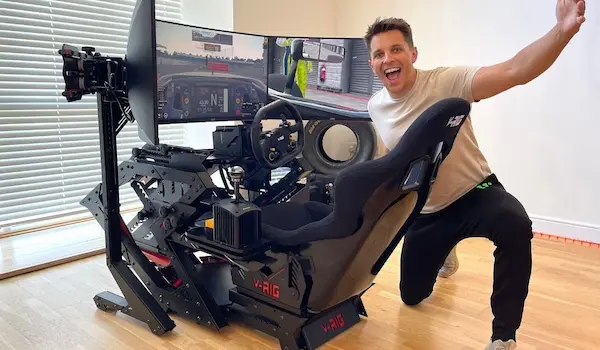
The first step in building your racing simulator is selecting the right chassis. The chassis serves as the foundation upon which all other components are mounted, so it’s crucial to choose one that is sturdy and can handle the forces you’ll be exerting on it. One popular option is the SimLab PX-1, a 90-pound aluminum chassis frame that offers excellent rigidity and stability ($703). Another option is the Next Level Racing F-GT cockpit, which includes a seat and adjustable rails for drivers of any height ($499).
Comfort is also a key consideration when choosing a chassis. Spending long hours in your simulator requires a comfortable seating position. Look for a chassis that offers adjustable features and includes a back bolster pillow for added support during extended sessions.
2. The Heart of the Sim: Selecting the Wheel
The wheel is the centerpiece of your racing simulator, providing the most important feedback for a realistic driving experience. When choosing a wheel, it’s crucial to opt for a force-feedback motor base that can provide accurate and immersive feedback. There are two types of force-feedback motor bases to consider: direct drive and belt-driven.
Direct drive units, such as the Simucube 2 Ultimate ($4,085), offer a more authentic experience by directly connecting the steering rack to the motor, eliminating any loss of feeling or details of the road. These units can generate up to 32 Newton meters of torque, providing a powerful and responsive driving experience. However, they come with a hefty price tag.
On the other hand, belt-driven units, like the Thrustmaster Leather Edition TX Wheel ($469), utilize a transmission between the motor and the steering rack. While they may not offer the same level of realism as direct drive units, they are more affordable and can still provide a satisfying driving experience. Many professionals, including Felix Rosenqvist, started with belt-driven units before upgrading to direct drive.
3. The Pedals: Achieving Realistic Braking
Realistic braking is crucial for achieving faster lap times and mastering the art of racing. When it comes to pedals, hydraulic reservoirs and dual dampeners are key features to look for. The Heusinkveld Ultimate Sim Pedals ($1,415) are highly recommended by professionals for their realistic feel and ability to handle hard braking without issues.
If you’re looking for a more budget-friendly option, the Thrustmaster TX Leather Edition pedals ($469) provide a solid performance. While they may not offer the same level of realism as high-end pedals, they can still improve your braking skills and enhance your overall racing experience. Additionally, Thrustmaster includes a rubber cone attachment that adds progressive resistance to the pedal, simulating the feel of a hydraulic pedal.
4. The Monitor: Optimal Visual Experience
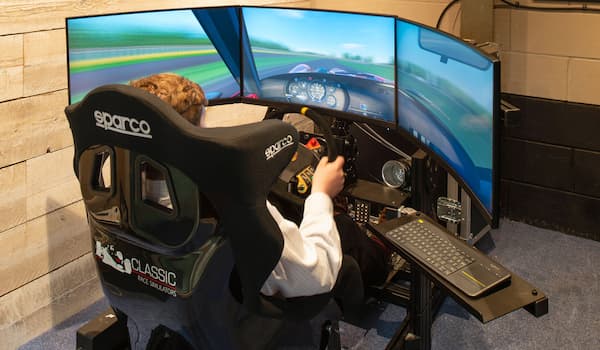
Choosing the right monitor is crucial for an immersive and visually stunning racing experience. When it comes to refresh rate, aim for a monitor with at least 144 Hz to ensure quick and responsive feedback. Delay in the monitor’s response can hinder your ability to make precise adjustments while driving.
Consider opting for an ultra-wide, curved screen for a more realistic field of view. The Asus ROG Strix XG49VQ ($899) is a 49-inch super ultra-wide HDR gaming monitor that offers exceptional clarity and no lag. Its curved design replicates the view from underneath a racing helmet, allowing you to focus on the track and anticipate corners more effectively.
5. The Console: Xbox or PC?
When it comes to choosing a console for your racing simulator, you have two main options: Xbox or PC. Xbox offers popular racing games like Forza Horizon 4 and Forza Motorsport 7, which provide a wide variety of vehicles and realistic race tracks. The Thrustmaster wheel controls are compatible with Xbox consoles, making it easy to navigate through the game’s menus.
On the other hand, if you’re looking for the most realistic and immersive racing experience, iRacing is the ultimate simulation software. It requires a PC or Mac running Windows OS through Boot Camp, as it offers hyper-realistic virtual racing with accurate car physics and laser-scanned race tracks. Many professional drivers, including Felix Rosenqvist, use iRacing to practice during lockdowns.
6. The Ultimate Sim Software: iRacing
For the most realistic racing experience, iRacing stands as the preeminent virtual racing league. It offers a hyper-realistic environment where all vehicles are perfectly mapped to their real-life counterparts. The software requires a monthly subscription and runs exclusively on a PC or a Mac running Windows OS through Boot Camp.
iRacing provides an array of race cars and tracks, allowing you to compete against other players in a highly competitive environment. The realistic physics and accurate handling make it a challenging but rewarding experience. Whether you’re aiming to improve your lap times or compete against the best, iRacing is the ultimate sim software for serious racers.
7. The Importance of a Good Computer
To run high-quality simulators like iRacing, a powerful computer is essential. While the graphics processor is crucial for delivering impressive visuals, the processor is even more important for handling the complex physics calculations required for realistic car handling. Look for a computer with a capable processor and a graphics card from reputable brands like Nvidia or AMD Radeon.
The Asus ROG Strix GA15DH ($1,407) is a mid-range option with a six-core processor, while the Maingear Vybe Stage 4 Boosted ($2,649) is a high-end system with an eight-core-plus processor. Both systems offer excellent performance for running simulators like iRacing, although the higher-end system may provide a more immersive experience.
8. Fine-tuning the Setup: Tips and Tricks
Once you’ve assembled your racing simulator, there are several tips and tricks to enhance your overall experience. Here are some suggestions to fine-tune your setup:
- Adjust the seating position: Experiment with different seating positions to find the most comfortable and ergonomic setup. Proper posture and positioning can improve your control and reduce fatigue during long racing sessions.
- Calibrate your wheel and pedals: Make sure to calibrate your wheel and pedals to ensure accurate and precise input. Most simulators offer calibration tools to help fine-tune the sensitivity and dead zones.
- Experiment with different force feedback settings: Each simulator and game may have different force feedback settings. Take the time to experiment with these settings to find the one that feels most realistic and comfortable for you.
- Invest in quality audio equipment: A good set of speakers or headphones can greatly enhance the immersion of your racing experience. Look for options with high-quality sound reproduction to fully appreciate the engine sounds and surrounding ambiance.
- Join online racing communities: Connecting with fellow racing enthusiasts can provide valuable insights, tips, and even opportunities for friendly competition. Online racing communities often organize events and leagues, allowing you to test your skills against other players.
9. Building on a Budget: Affordable Alternatives
Building a racing simulator doesn’t have to break the bank. If you’re on a budget, there are several cost-effective alternatives that can still provide an enjoyable racing experience. Consider the following options:
- DIY chassis: Instead of purchasing an expensive chassis, you can build your own using readily available materials like wood or metal. Numerous online tutorials and forums offer step-by-step instructions for creating a custom chassis.
- Entry-level wheel and pedals: While high-end wheels and pedals offer superior performance, entry-level options can still provide a satisfying experience for beginners. Look for affordable options from reputable brands like Thrustmaster or Logitech.
- Used monitors or TVs: Instead of investing in a brand-new monitor, consider purchasing a used one or repurposing a TV. Many second-hand monitors offer adequate refresh rates and resolution for a fraction of the cost.
- Open-source sim software: If you want to save on software costs, consider exploring open-source simulators like Racer or VDrift. These programs may not offer the same level of realism as commercial options but can still provide hours of racing fun.
Remember, building a racing simulator is a gradual process, and you can always upgrade and add components over time as your budget allows.
10. Maintaining Realism: Upgrading Your Setup
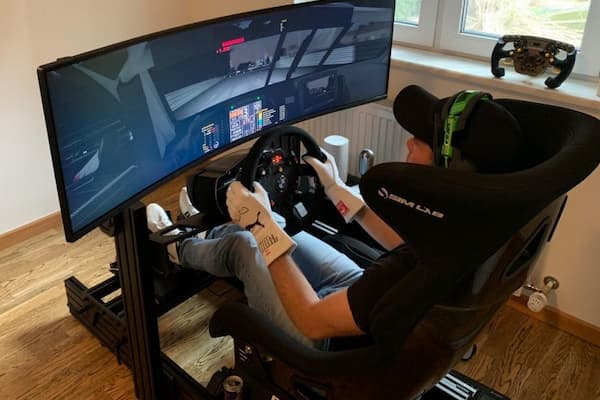
As you become more experienced and invested in your racing simulator, you may want to consider upgrading your components to enhance realism further. Here are some upgrades to consider:
- Advanced force feedback wheel: If you started with a belt-driven wheel, consider upgrading to a direct drive unit like the Simucube 2 Ultimate for a more immersive and realistic driving experience.
- High-end pedals: Upgrading to high-end pedals like the Heusinkveld Ultimate Sim Pedals can provide a more realistic and precise braking feel, allowing for more nuanced control during races.
- Triple-screen setup: For a wider field of view and increased immersion, consider investing in a triple-screen setup. This configuration eliminates the break in the field of vision found in single monitors, providing a more seamless and realistic experience.
- Virtual reality (VR) headset: If you crave the ultimate immersive experience, a VR headset can transport you directly into the virtual racing world. VR headsets like the Oculus Rift or HTC Vive offer a truly immersive experience, allowing you to look around the cockpit and track as if you were there in person.
Remember, these upgrades are optional and depend on your budget and personal preferences. A well-tuned and well-configured racing simulator can still provide an exhilarating racing experience even without the most high-end components.
11. Simulating the Sensation: Torque and G-forces
One of the most challenging aspects to simulate in a racing simulator is the sensation of torque and G-forces. Professional drivers and teams use hydraulic platform rigs capable of generating up to 2 Gs to replicate these sensations accurately. However, for a home setup, it’s necessary to make compromises.
According to Felix Rosenqvist, a professional IndyCar driver, a home simulator can get close to replicating the feeling of being in a real car. While there may always be something missing, it’s still possible to experience a significant level of realism. By pushing a car to its limits in a simulator, you can develop a sense of how it responds and handles, allowing you to improve your driving skills.
12. Conclusion: Start Racing from Home
Building your own racing simulator offers a thrilling and immersive racing experience without the need for a massive budget or innate talent. By carefully selecting the right components, such as the chassis, wheel, pedals, and monitor, and choosing the best sim software like iRacing, you can create a setup that brings the excitement of racing right into your living room.
Remember, building a racing simulator is a personal journey, and it’s essential to find the right balance between budget and performance. Whether you’re a casual racing enthusiast or aspiring professional, a well-designed and well-configured racing simulator can provide countless hours of excitement and help you improve your skills behind the virtual wheel. So, start your engines, and enjoy the thrill of racing from the comfort of your own home!