Drones are fun and useful. Still, sometimes they don’t start when needed. Wondering: Why is my drone not turning on? Read this complete article to better understand the facts.
Common causes include a dead battery, a loose battery connection, or a broken power button. Other issues can be a controller not connecting, needing software updates, or physical damage like loose wires. Checking each part and making sure everything is set up correctly can help fix the problem.
Understanding why a drone cannot turn on is important for safe flying. This extensive guide covers common issues, from battery problems to environmental factors. It will also provide helpful solutions.
Table of Contents
Key Takeaways
- Battery Check: Ensure the battery is fully charged and properly connected. Do it to power the drone.
- Power Button: Make sure the power button is pressed firmly and held for a few seconds to activate.
- Loose Connections: Check for any loose cables or parts that will need securing to start the drone properly.
Battery And Power Issues
Battery and power issues are the most common reasons why drones won’t turn on. When the battery isn’t charged or properly connected, the drone won’t get enough power to start. Understanding how to check the battery, connections, and power button can help fix these problems and get your drone flying.
Low Or Dead Battery
When the drone’s battery is low or dead, it won’t have enough power to turn on. Before using your drone, always check the battery level to make sure it’s fully charged. Batteries can lose power even when they’re not being used, so it’s important to charge them regularly. Keeping the battery charged helps your drone work properly.
Battery Not Properly Connected
When the battery isn’t connected properly, the drone won’t get the power it needs to start. Ensure the battery is securely placed in its slot, with the connections lined up correctly. When the battery is loose or not aligned, it cannot work, and the drone won’t turn on. Double-checking the battery’s position helps prevent this issue.
Faulty Charging Cable Or Port
A damaged charging cable or port can stop the battery from charging properly, which means the drone won’t turn on. Check the cable for any cuts or damage, and look closely at the charging port to make sure it’s clean and not bent. When you find any problems, replacing the cable or fixing the port can help the battery charge correctly, allowing the drone to work.
Power Button Malfunction
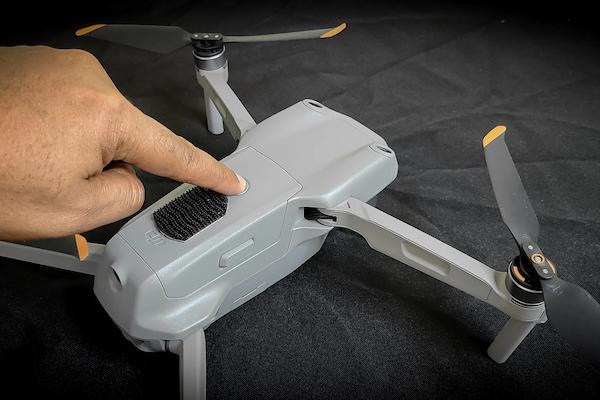
When the power button isn’t working correctly, the drone cannot turn on. Try pressing and holding the button firmly for a few seconds. When the button feels stuck or doesn’t respond, there can be an issue. It will need to be fixed or replaced to get the drone working. Checking the power button carefully helps ensure it’s not the reason for the problem.
Remote Controller Problems
Remote controller problems can stop your drone from turning on or responding. When the controller isn’t paired correctly, has a low battery, or experiences signal interference, it cannot work with the drone. Understanding these issues and checking the controller can help make sure it connects and works properly.
Controller Not Paired
When the controller isn’t paired with the drone correctly, the drone won’t respond or start. To fix this, follow the pairing steps in the manual carefully. Ensure both the drone and the controller are turned on and close enough to each other. When they are too far apart, the pairing won’t work. Ensuring they’re properly paired helps the drone connect and operate correctly.
Low Controller Battery
When the controller’s battery is low, it cannot connect to the drone properly. Always check the battery level before using the controller to ensure it has enough power. When the battery is low, recharge it or replace it with a new one. A fully charged controller is important for pairing and controlling the drone smoothly. This simple check can prevent connection issues.
Interference Affecting Signal
When other electronic devices, like Wi-Fi routers, are nearby, they can interfere with the controller’s signal. This makes it hard for the drone to connect. To fix this, try moving to a different area with fewer devices or signals around. Check that no strong electronic equipment is close by. Reducing interference helps the controller connect to the drone more easily and improves control.
Firmware Mismatch Issues
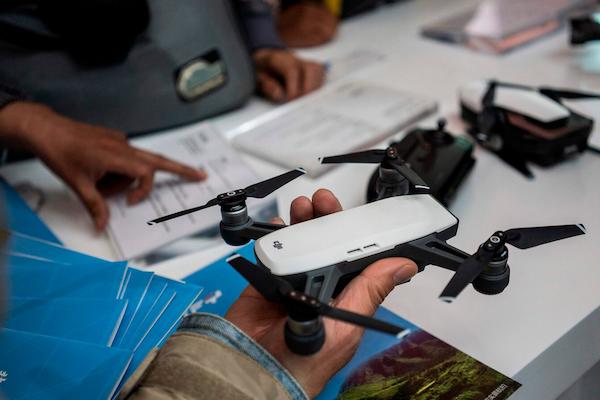
When the drone and controller have different firmware versions, they cannot connect correctly. Firmware is like the software that helps them work together. When one device has an update and the other doesn’t, it can cause problems. Always check for firmware updates on both the drone and the controller.
Ensure they’re updated to the latest versions so they match and can pair properly. This helps avoid connection issues.
Faulty Controller Hardware
When the controller’s hardware is damaged, it cannot work or connect to the drone correctly. To find out whether the controller is the problem, try testing it with another drone, if you have one. When it still doesn’t work, the hardware can be broken, and you will need to get it fixed or replaced. Checking this helps make sure the controller isn’t stopping the drone from working properly.
Firmware And Software Issues
Firmware and software updates are important for keeping your drone working well. When these updates aren’t done, or when they get interrupted, the drone cannot start or work correctly. Always check for the latest updates for your drone and its controller. Ensure to install them completely without stopping the process. Keeping everything updated helps prevent problems and makes sure your drone runs smoothly.
Outdated Drone Firmware
When the drone’s firmware is outdated, it cannot start properly. Manufacturers release firmware updates to fix problems and make the drone work better. To avoid issues, check the manufacturer’s website or app regularly for any new updates. Ensure to install them as soon as they’re available. Keeping the firmware up-to-date helps the drone start and operate smoothly, avoiding any startup troubles.
Corrupted Software Update
A corrupted software update can cause the drone to not turn on properly. This happens when the update process is interrupted or doesn’t complete correctly. To fix this, try restarting the drone and reinstalling the update. Ensure not to stop the update while it’s happening, as that can cause problems. Following these steps helps keep the software working and the drone starting correctly.
Incompatible Mobile App Version
When the mobile app version doesn’t match the drone’s software, the drone cannot work correctly. Always check whether the app you’re using is compatible with the drone’s software. When it’s outdated, update the app to the latest version so it can support your drone properly. Keeping the app updated ensures everything connects smoothly and the drone functions without problems.
Physical Damage Or Defects
Physical damage or defects can stop your drone from turning on or working properly. Issues like broken propellers, loose wires, or cracks in the drone’s body can affect how it functions. It’s important to check for any visible damage and fix it to ensure your drone starts and operates safely.
Damaged Propellers Or Arms
When a drone’s propellers or arms are broken or bent, it cannot fly or start properly. Carefully check these parts for any damage. When you see any cracks or bends, you’ll need to replace them to make sure the drone can fly safely. Keeping propellers and arms in good condition is important for the drone to work correctly and avoid accidents.
Loose Or Broken Wiring
When the wires inside the drone are loose or broken, the drone cannot turn on at all. Carefully check the wires and connections to ensure they are tight and in place. When you find any broken wires, you’ll need a professional to fix them. Keeping the wiring secure helps the drone receive power properly and start without any problems.
Cracked Drone Body
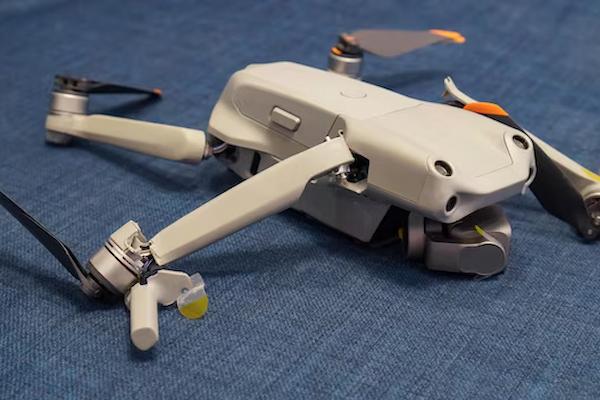
When the drone’s body has cracks, it can affect how the drone works or even stop it from turning on. Check the drone’s body carefully for any visible cracks or damage. When you find any, the cracks can be interfering with important parts inside the drone. In that case, you’ll need to repair or replace the damaged parts to get the drone working again safely.
Faulty Internal Components
When parts inside the drone, like the motherboard, are not working correctly, the drone cannot start. Fixing these internal parts is tricky and usually needs a professional. It’s important not to open the drone unless you know how to fix electronics safely. Trying to repair these parts without proper skills can cause more damage. Getting professional help ensures the drone is repaired correctly and safely.
Water Or Moisture Damage
When water or moisture gets inside the drone, it can harm its sensitive electronic parts. Always make sure the drone is completely dry before trying to turn it on. Moisture can create short circuits and damage the drone permanently. To avoid this, keep the drone away from water and wet areas. When it does get wet, let it dry fully to prevent any serious problems when you power it on.
Environmental Factors
Environmental factors like temperature, altitude, wind, and weather can affect how your drone works. Extreme conditions can stop the drone from turning on or cause it to malfunction. Understanding these factors and knowing when and where to fly your drone safely can help prevent issues and keep your drone working properly.
Temperature Extremes Affecting Startup
When a drone is used in very hot or cold temperatures, it can have trouble starting. Extreme temperatures can drain the battery quickly or harm important parts inside the drone. To avoid this, always check the manufacturer’s temperature range. Then, ensure the drone is used and stored within those limits. This helps keep the drone safe and ensures it starts and works properly.
Altitude Limitations For Drones
Drones are designed to work within specific altitude limits. When you try to start the drone too high up, it cannot work correctly. High altitudes can affect how the drone’s motors and sensors function. Always check the drone’s manual to know the recommended altitude range. Flying the drone within these limits helps avoid any problems and ensures that it starts and operates properly.
Wind And Weather Considerations
Strong winds and bad weather can make it hard for a drone to fly and stay stable. These conditions can also interfere with the controller’s signal, making it difficult to control the drone. To keep your drone safe, avoid flying in strong winds, rain, or storms. Always check the weather forecast before using the drone to make sure conditions are safe for flying.
Troubleshooting Steps To Fix The Issue
When your drone isn’t starting, following the right troubleshooting steps can help fix the issue. Start by checking whether the battery is fully charged and properly connected. Next, ensure the controller is paired and the software is updated. Look for any visible damage, like loose wires or broken parts. Finally, test the drone in a safe area with no interference. These steps help identify and solve problems, keeping the drone working well.
Check Battery Charge And Connection
To fix your drone, first check the battery’s charge level. Ensure it’s fully charged before trying to start the drone. Then, look at how the battery is connected to the drone. It must fit snugly and securely in its place. When you notice any loose connections, tighten them carefully. These simple checks ensure that the drone gets the power it needs to turn on and work correctly.
Restart And Pair The Controller
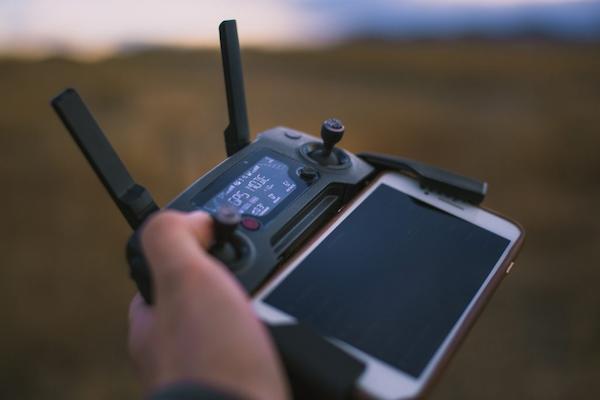
When the drone isn’t responding, try restarting both the drone and the controller. Turn them off, then back on. Next, follow the instructions in the manual to pair them again. Ensure the controller has a full charge before you start the pairing process. Carefully follow each step to ensure the controller and drone connect properly. Doing this helps fix any connection issues and gets the drone ready to fly.
Update Firmware And Software
To ensure your drone works properly, check for updates on both the drone’s firmware and the mobile app you use to control it. Manufacturers release updates to fix problems and improve how the drone works. When you find any updates, install them right away. This helps the drone and app work together without any bugs or issues. Keeping everything updated ensures your drone can start and operate correctly.
Inspect For Physical Damage
Carefully look over your drone to see if there’s any visible damage. Check for broken propellers, cracks in the body, or loose wires. These issues can stop the drone from starting or flying properly. When you find anything broken, you’ll need to fix or replace the damaged parts. Fixing these issues helps ensure the drone is safe to use and can work correctly when you turn it on.
Test In A Safe Environment
When testing your drone, choose a safe and open area, like a park, where there are no obstacles. Ensure there are no strong electronic signals nearby, like Wi-Fi networks, that can interfere with the drone’s connection. Also, avoid testing in bad weather, such as strong winds or rain.
This way, you can check whether the drone works properly in a safe setting, and if any issues still happen, you’ll know they’re not caused by the environment.
When To Seek Professional Help
Sometimes, even after trying to fix the problem, the drone still won’t work. In these cases, it’s important to seek professional help. Experts can identify and repair issues that are too complicated to fix at home, like broken parts or internal damage. Knowing when to get help keeps your drone safe and working well.
Persistent Startup Problems
When your drone still won’t start even after trying to fix it yourself, you’ll need professional repair. Experts have the tools and knowledge to find hidden problems that you cannot see or fix on your own. They can check the drone’s parts and electronics more thoroughly. Getting professional help ensures that any serious issues are fixed correctly, so your drone can work properly again.
Damaged Or Faulty Parts
When your drone has damaged or faulty parts, like broken propellers or problems with internal components such as the motherboard, it’s best to get professional help. Experts have the right tools and skills to safely repair these complicated parts without causing more damage. They know how to fix electronics correctly, ensuring the drone works well again. Trying to fix these parts on your own could make things worse, so it’s safer to trust a professional.
Warranty And Repair Options
When your drone isn’t working, check if it’s still under warranty. A warranty means the manufacturer can repair or replace defective parts for free. Look at your drone’s warranty details to see how long it lasts and what it covers. When your drone is still covered, contact the manufacturer’s customer support for help. They can tell you about repair options and guide you on how to fix or replace your drone properly.
FAQs
1. Can Overheating Affect My Drone Turning On?
Yes. Overheating can prevent your drone from turning on because high temperatures can damage the battery and internal parts. When a drone overheats, it can shut down to protect itself. Always let it cool down and avoid using it in quite hot conditions.
2. Could A Blown Fuse Be The Reason My Drone Won’t Turn On?
Yes. A blown fuse can stop your drone from turning on. The fuse helps protect the drone’s electronic parts, and if it’s damaged, power can’t reach the drone. When you suspect a blown fuse, check your drone’s manual for guidance or ask a professional to replace it safely and fix the issue.
3. Can The Drone’s Safety Features Prevent It From Turning On?
Yes. Drones have safety features that can stop them from starting if certain conditions aren’t met, like low battery levels, overheating, or obstacles detected nearby. These features protect the drone from damage. Check these conditions and ensure everything is safe before turning it on again.
Conclusion
Drones cannot turn on due to several reasons like battery problems, software issues, physical damage, or environmental conditions. It’s important to check each of these areas to find the problem. Start by looking at the battery charge, connections, and controller settings.
Ensure the software is up-to-date and inspect for any physical damage like broken propellers or loose wires. Also, check the environment—avoid flying in extreme weather or near strong signals. When you’ve tried these steps and the drone still won’t turn on, it can be a more serious issue inside the drone.
In that case, it’s best to ask for help from a professional who knows how to fix drones safely. They have the tools and skills to repair any damage. This ensures your drone works properly again. Taking these steps keeps your drone safe and ready to fly.